

The payment flow
1
Customer clicks Pay Now on an invoice
The customer opens an unpaid invoice in the client area and clicks the Pay Now button rendered by
paybridgenp_link(). WHMCS posts back to the same invoice URL with a hidden flag that tells the gateway to create a checkout session.2
Module creates a PayBridgeNP checkout session
Inside
paybridgenp_link() with the redirect flag set, the module:- Reads the invoice total and converts it to paisa (
total × 100, rounded) viaAmount::toPaisa() - Builds the return URL and cancel URL - both point at
modules/gateways/callback/paybridgenp.php?invoiceid=<id>, using the Public Callback URL if set or the WHMCS System URL as fallback - Calls
PayBridgeNP::checkout->create()via the PayBridgeNP PHP SDK withamount,currency=NPR,return_url,cancel_url, and metadata (invoice id, client id, client email, WHMCS version,source=whmcs) - Writes a
checkout.createdentry to the Gateway Log with the session id
checkout.api_error to the Gateway Log.On success, it returns HTML that redirects the browser to the hosted checkout URL via <meta http-equiv="refresh"> + <script>window.location.href=…</script> + a manual fallback link.3
Customer pays on the hosted checkout
The customer lands on
https://checkout.paybridgenp.com/checkout/cs_…, sees your merchant name and the invoice total, picks an available eSewa, Khalti, or configured Fonepay method, and completes the payment.4
Browser return URL - no state change
After the wallet confirms the payment, PayBridgeNP redirects the customer’s browser back to:The callback file detects this is a browser return (no
X-PayBridgeNP-Signature header) and calls paybridgenp_handle_return(), which:- Validates the invoice id
- Redirects the customer to the WHMCS invoice view with a flash query param (
?paybridge_status=submitted/cancelled/failed) - Does not touch invoice state - the webhook (next step) is the only authoritative confirmation
status=success and a guessed invoice id. Only the HMAC-signed webhook can move the invoice to Paid.5
Webhook delivery - invoice → Paid
A few seconds after the wallet confirms the payment, PayBridgeNP fires a signed The callback detects the signature header and calls
payment.succeeded webhook to the same callback URL:paybridgenp_handle_webhook(), which:- Reads the raw request body and the
X-PayBridgeNP-Signatureheader - Looks up the webhook signing secret from gateway settings - refuses with HTTP 400 if the secret is not configured (no unsigned fallback)
- Verifies the HMAC-SHA256 signature via the PayBridgeNP PHP SDK’s
constructEvent()- rejects forged events and replays older than 5 minutes - Extracts the invoice id from
event.data.metadata.invoiceid - Calls WHMCS’s
checkCbInvoiceID()to ensure the invoice exists and belongs to this gateway - Calls WHMCS’s
checkCbTransID()to dedupe by PayBridgeNP payment id - if the same webhook is replayed, this exits early before any double-apply - Calls
addInvoicePayment()with the amount converted back to rupees, the payment id as the transaction id, and zero fees - Writes a
webhook.payment_appliedentry to the Gateway Log with the provider, payment id, and amount - Returns HTTP 200
OK
Invoice state transitions
What the webhook handler does for each event type
payment.failed deliberately doesn’t move the invoice to a failed state - WHMCS keeps it Unpaid so the customer can retry. The failure is recorded in the Gateway Log for merchant visibility. PayBridgeNP also emits payment.cancelled when the buyer backs out on the provider page; the module logs it without changing the invoice state, so subscribing to it is optional.
The refund path
When an admin clicks Refund on a transaction tied to the PayBridgeNP gateway, WHMCS callspaybridgenp_refund() with the transaction id and the amount to refund.
The module:
- Maps the refund amount to paisa
- Calls
PayBridgeNP::refunds->create()withpaymentId,amount(paisa),reason=other, and anotesfield containing"Refund issued from WHMCS admin (invoice #<id>)" - Logs the result to the Gateway Log
- Reports the result to WHMCS
- Khalti: A completed refund is reported to WHMCS as
status=success, with the PayBridgeNP refund id. WHMCS then records the refund against the original transaction and adjusts the invoice totals. Partial refunds use the same path. - eSewa: PayBridgeNP records the refund as
requires_action. The module returnsstatus=declinedwith a message telling you to pay it out in the eSewa merchant portal, then mark the invoice refunded in WHMCS. Partial refunds use the same path. - Fonepay: The create-refund API refuses the request, so the module returns
status=declined. Refund the payment from the PayBridgeNP dashboard, then record the result in WHMCS manually.
status=declined. Any other refund response is returned as status=success, with its refund id.
PayBridgeNP’s refund API requires
reason to be one of customer_request | duplicate | fraudulent | other. The module defaults to other and puts the WHMCS-specific context in the notes field, which is stored with the refund in PayBridgeNP.Where the module lives in your WHMCS install
After extraction, the module’s files are under:vendor/ directory is bundled inside the ZIP - you do NOT need to run composer install on your server.
The Gateway Log
Every interaction flows through WHMCS’s standardlogTransaction() helper, which surfaces under Utilities → Logs → Gateway Log:
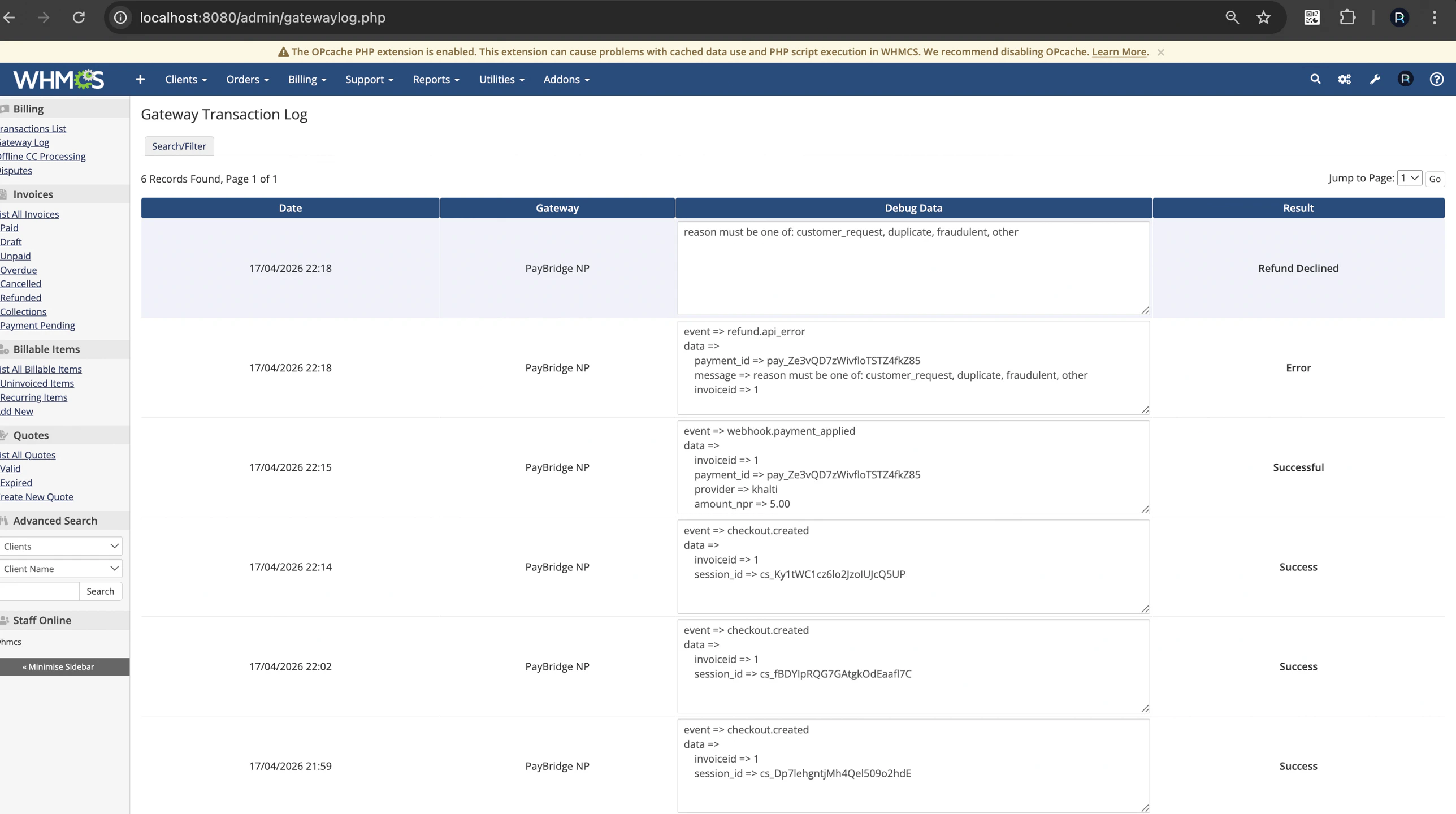
Gateway Log entries - checkout creation, webhook delivery, refund attempts all visible with structured payloads.
API keys, the webhook signing secret, and the
X-PayBridgeNP-Signature header value are automatically redacted before they land in the log - safe to share with support without exposing credentials.
Security model
- Webhook signature verification is mandatory. The module refuses to process webhooks unless the signing secret is configured (HTTP 400 response). There is no unsigned fallback.
- 5-minute replay window. HMAC verification rejects events older than 5 minutes based on the
t=timestamp in the signature header. checkCbInvoiceID+checkCbTransIDare WHMCS built-ins that prevent cross-gateway payment application and duplicate postings.logTransactionscrubbing. The module’sLoggerclass redactsapi_key,secretKey,testSecretKey,webhookSecret,signing_secret,authorization, andX-PayBridgeNP-Signaturebefore passing data tologTransaction().- No raw SQL anywhere. All invoice operations go through WHMCS’s
addInvoicePayment()/ helper functions. hash_equalscomparisons inside the SDK for signature matching - timing-safe.
What’s next
- Troubleshooting - common issues and how to fix them
- Back to installation if you haven’t set up the gateway yet